Sudoku Terminal Game in C

Terminal Sudoku
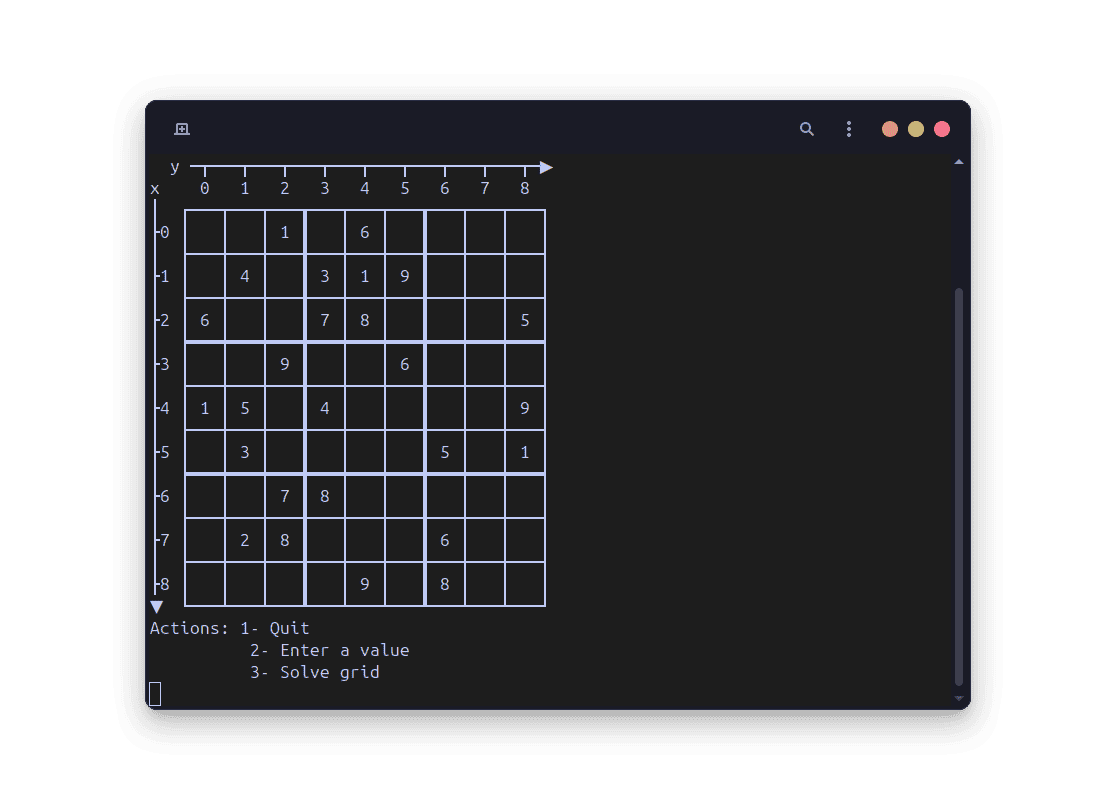
This is a small project I made back when I was learning C and wanted something concrete to practice algorithms, input handling, and “real” program structure. It's a terminal-based Sudoku game where you can either enter a grid manually or generate a random one, then solve it yourself or let the program solve it. You can check out the code on GitHub.
What it does
The program supports a few simple flows: generate a grid, play manually by entering coordinates, and (optionally) ask the solver to finish the grid.
I also put some effort into the terminal rendering so the grid is readable and has row/column coordinates, using Unicode box-drawing characters.
Main features
- Random grid generation.
- Manual solving by entering x/y coordinates and a number.
- Automatic solver (backtracking).
- Move validation: no duplicates in row, column, or 3x3 region, and only fill empty cells.
How the solver works
The automatic solver uses backtracking: it tries to fill the grid step by step, and when it reaches a contradiction it “rewinds” and tries a different option.
In practice, it repeats the same loop: pick an empty cell, test the numbers 1 to 9 that respect Sudoku rules (row, column, and 3x3 block), and recurse until the grid is complete.
To make it faster (and because I wanted to experiment a bit), the solver doesn't just pick the first empty cell: it searches for the empty cell with the fewest possible candidates first.
This reduces useless branching and usually speeds up solving, because it forces the algorithm to deal with the “hardest” cells earlier.
The algorithm
- Look for an empty cell (a
0in my grid). - If there are no empty cells left, the Sudoku is solved.
- For the chosen empty cell, compute which numbers from 1 to 9 are allowed:
- Not already in the same row.
- Not already in the same column.
- Not already in the same 3x3 region.
- Try each allowed number:
- Place it in the cell.
- Recursively solve the rest of the grid.
- If it fails later, reset the cell back to
0and try the next number.
- If no number works, backtrack to the previous decision.
Tiny pseudocode
solve(grid):
  cell = empty cell with fewest candidates
  if no empty cell:
    return true

  for n in 1..9:
    if n is valid at cell:
      place n
      if solve(grid):
        return true
      remove n (set back to 0)

  return false
Random grid generation
The “random grid” mode starts by placing a small number of random valid values, then uses the solver to complete the grid into a full solution.
After that, it removes a bunch of cells (turning them back to 0) to create a playable puzzle.
Concretely, the code:
- Seeds randomness with
srand(time(NULL)). - Places 10 random valid numbers.
- Solves the grid fully.
- Removes 55 filled cells.
This was made as a learning project, so the generator doesn't guarantee a unique solution every time.
What I learned (and limits)
This project taught me a lot of fundamentals: recursion, backtracking, and how to structure small C programs with clear functions and careful input validation.
Limitations / things I'd improve
- The generator may create puzzles that aren't uniquely solvable (fine for a learning demo, but not ideal for a “real” Sudoku generator).
- If I did it again, I'd separate the UI from the solver logic more cleanly (multiple files, cleaner state handling).
- There is no level of difficulty adjustment for generated puzzles, which could be an interesting addition.